New Features
Match Groups
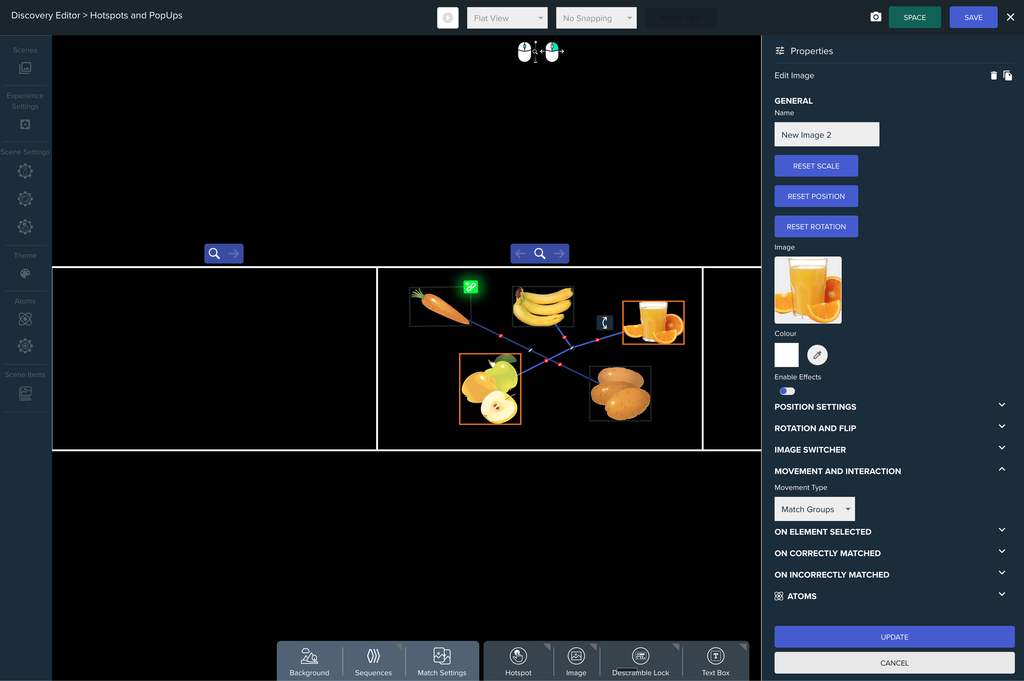
Image and Video Draggables can now be linked together into Match Groups. In Play Mode, users match items by selecting the elements that belong together. Groups are created and edited in Edit Mode using the link gizmos on each element.
- Element Behaviours: play when an element is Selected, Correctly Matched or Incorrectly Matched. Choose from Scale, Glow, Colour, Image Swap and Video Swap, all sharing one duration and easing.
- Group Behaviours: play once a whole group is matched. Join the group’s elements with a line, or stack them together in a pile or a row.
- Selection lines: optionally draw a line between elements as they are selected, with an optional draw animation.
- Audio: play sounds on selection, on a correct group match and on an incorrect group match.
- Themes: settings come from a Global Theme, a per-Scene Theme or the element itself, so a scene can follow the experience or override it.
- Variables: set Atoms when an element is selected, when a group is matched correctly or incorrectly, and when every group has been matched.
- On completion: when every group is matched, the scene can do nothing, follow an Experience Link or Scene Link, or open a PopUp.
Faster Flat View
Dynamic Resolution is now enabled for Flat View, which should improve performance on lower-spec machines.
Target Point Ordering
Target Points and their links now appear directly below the lowest element they are connected to, so they no longer get hidden behind other draggables.
Other Improvements
- Internal: refactored the UnityReactBridge, which handles communication between Unity and React.
Bug Fixes
- Link selection: selecting a Match Group or Target Point link and then opening another tab (such as Background) no longer leaves the link’s gizmos on screen. The link is now deselected when the right panel leaves its section.
- Link Gizmo: when an Image or Video is made a Match or Drag element, the Link Gizmo now renders on top of the Scale Gizmo.
- Right offset: the right offset is now applied correctly when draggables are selected.
- Restart Scene: Restart Scene in the End Sequence now works correctly when a floor is present.
- Draggable lists: empty (null) draggable entries are now handled safely and removed from the config, preventing issues on the React side.
- Scene transitions: Scene Transition Style now works correctly in the Atom Event System.