New Features
Text Overflow Settings
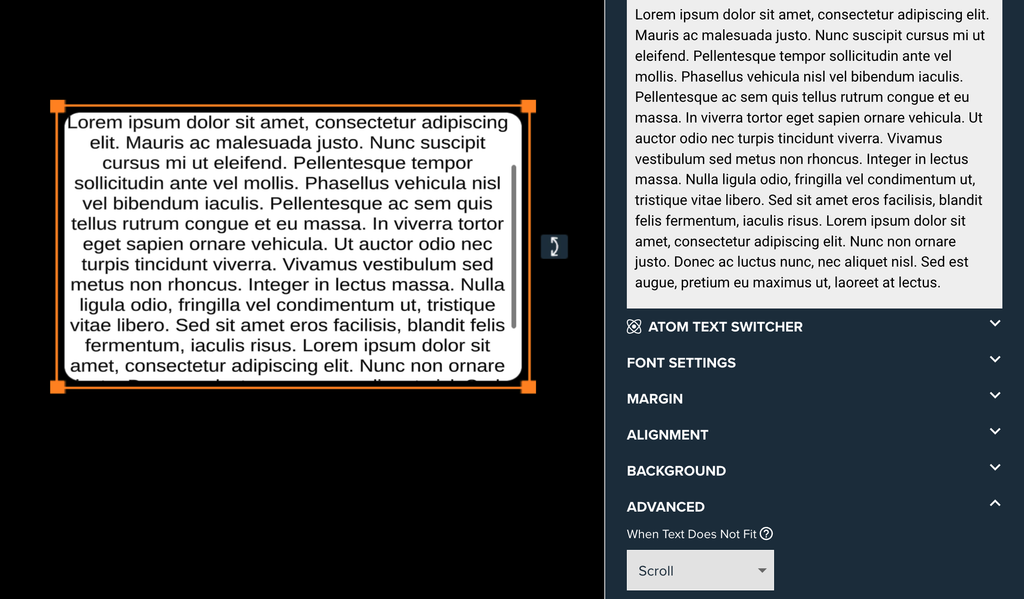
Text Boxes have a new When Text Does Not Fit setting in Advanced Settings, with three modes:
- Overflow: text can display outside the box.
- Dynamic Size: the box grows downwards to fit its text. It sizes to the text entry currently shown and never goes smaller than the default Text Draggable size. The Move and Scale Gizmo can’t resize the height in this mode.
- Scroll: text stays inside the box and can be scrolled. The scrollbar uses the text colour and sits inside the background border.
Existing Text Boxes are migrated to Overflow, so they behave as before. New Text Boxes use Dynamic Size.
Text Effects
A new Text Effects group, below Advanced Settings, adds animation to Text Boxes and Text PopUp slides.
- Entry Effect: Fade In, Slide In, Pop In or Typewriter, played when the text appears or changes. Play On sets when it first plays: On First Appear, On Intro Complete, or Atom Only (the text shows as it is and the effect plays each time the Entry Trigger fires). The Entry Trigger replays it on demand.
- Exit Effect: Fade Out, Slide Out or Pop Out, played when its trigger fires. The text then stays hidden until it changes or the Entry Effect plays again. Text Boxes only.
- Triggerable Effects: looping effects (Pulse, Wave, Shake, Swing or Wiggle) that keep playing while the text is on screen. Each is started by an expression or a trigger and plays indefinitely or for a set number of seconds. Whichever started most recently is the one that plays.
- Stop All Current Effects: a trigger in the Atoms group that stops everything playing on that text.
- Effect settings: each effect has its own Speed, Character Offset and one value that shapes it, such as Slide In From or Wave Height. Amounts are set from 0 to 100%; Typewriter Letter Gap and Duration are in seconds, and Wiggle Angle is in degrees.
- Previews: Preview buttons play an effect while editing, without waiting for an Atom. Changing an Entry or Exit Effect setting while editing replays that effect automatically.
- Text Effect Style: a Text Effect Style asset scales every effect in an experience at once.
Exit Effects and Triggerable Effects need Atoms to start them, so both are hidden when Atoms are not enabled. Slide In and Slide Out keep the text inside its box whichever overflow mode is set.
Text Box & PopUp Improvements
- Rounded corners: text is now clipped to the rounded corners of the background.
- Borders: text no longer displays over the background border while scrolling.
- Text and Split PopUps: text that is too big for the PopUp can now be scrolled. Swiping between slides works as before.
Bug Fixes
- Disabled images: fixed images blocking interaction when they were disabled immediately.