✨ New Features
Global RTL
A new Experience-level setting lets you enable Right-to-Left (RTL) for all text fields at once. Individual fields can either inherit this default or be overridden with a custom value. Existing experiences will be automatically migrated to the new system.
Copy & Paste Improvements
Pasting objects that reference Atoms, Molecules, or Polymers is now much smarter:
- Choose to recreate missing Atoms (“Create Atoms”) or paste without them (“Paste without Atoms”).
- Pre-Defined (scene-level) variables cannot be recreated and are excluded.
- Warning messages improved for clarity, including better formatting when describing where missing elements are used.
- Fixed paste warning appearing on right-click when a non-scene-compatible draggable is in the clipboard.
Space Settings
New settings allow you to alter the physical layout of your space:
- Physical Aspect Ratio
- Wall Centre Gap
- Centre Wall Width
- Floor Width
- Floor X Offset
Aspect Ratio Settings
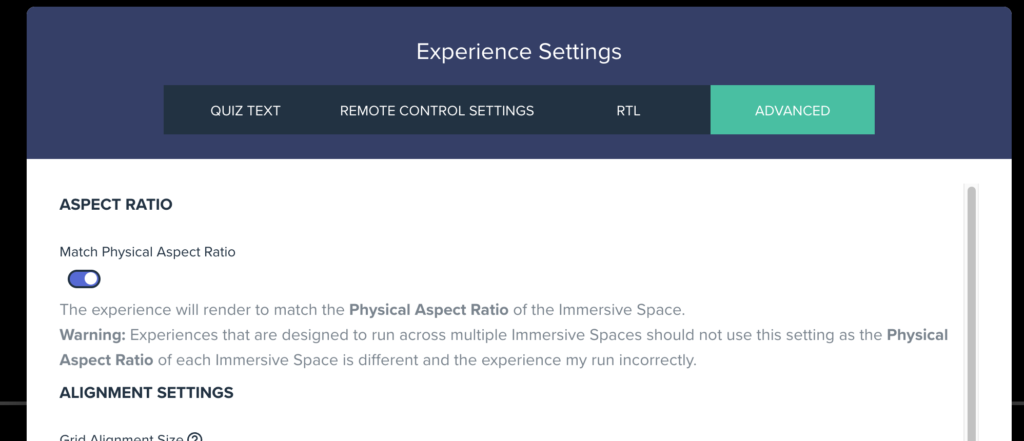
- New global setting: Match Physical Aspect Ratio.
- Existing Scene Aspect Ratio Settings now include a Use Default option.
- Remote Control can now force Dynamic Aspect Ratio.
PopUp Preview Improvements
- PopUp previews now stay within the available canvas when the left panel is open — scaling down and recentering as needed.
Media Draggables — Flip Animation
- Image and Video Draggables now support switcher flip animations with horizontal and vertical direction controls.
Draggable Preview Buttons
- Video Draggables: Added Edit Mode play/pause button and a Preview button to the video index switcher.
- Image Draggables: Added a Preview button to the image index switcher.
- Text Draggables: Added a Preview button to the text index switcher.
Other Improvements
- Voting Quiz: Correct Answer label and Voted text are now user-editable and support RTL.
- Vital Monitor Remote Control: Fixed issue where changing settings wouldn’t apply correctly.
- Atom Event System: Play Audio now has a volume option.
🐛 Bug Fixes
- Web layout: Fixed issue where CentreWall Width and Floor Width were 0 in web builds.
- Image Switcher: Images with Image Switcher set to On Tap now work correctly.
- Atom Expressions: Fixed parsing for complex expressions with embedded functions within functions.